Selected examples and notebooks
Run the MATLAB commands locally and inspect their saved results in the notebooks. Start with a representative storage or validation case, then use the smaller workflow checks to explore chemistry settings.
Choose how to run an example
Setup check: use
runPhreeqcValidation('totalDays', 2,
'plotResults', false)
or the four-cell mineral notebook to check dependencies. These short runs do not reproduce full-duration figures.Tutorial run: follow a notebook’s stated grid, schedule, and physical switches. Storage examples can be substantially larger than setup checks.
Exact reproduction: use the configuration and source dataset identified for the displayed result. A default example with a different cycle count, grid, or kinetic model does not reproduce that figure.
Saved-result exploration: redraw the exported multirate histories or inspect the three-cycle animation. Their provenance records identify the saved inputs; the documentation build does not rerun MATLAB simulations.
Open h2-biochem/examples/Contents.m in this checkout for the example
catalogue. Initialize H2sim with startupH2sim before running examples.
Small hydrogen-mixing animation
A small adaptation of a published hydrogen benchmark. Watch gravity and diffusion redistribute two gases; no PHREEQC is required.
A four-layer Gaussian structure, cushion injection, shut-in and ten storage cycles. Watch the plume, well operation and hydrogen inventory.
Storage in saline aquifers
Hydrogen build-up, structural trapping, injection, and withdrawal in the existing aquifer model. Gravity, capillarity, and dissolved hydrogen.
Storage in depleted gas reservoirs
The existing 2D case with residual methane, MET, ACE, and SRB. Compare bacterial and abiotic injection and withdrawal on the original grid.
Thermodynamics
Compare RK, SW, PR, and Henry–Setschenow calculations with supplied ePC-SAFT reference tables. Inspect the route to black-oil PVT tabulation.
PHREEQC validation
A 20-cell, 250-day injection–storage–production comparison with a separate reference implementation. Compare H₂ consumption, dissolved hydrogen, pH, DIC, and the three metabolic pathways.
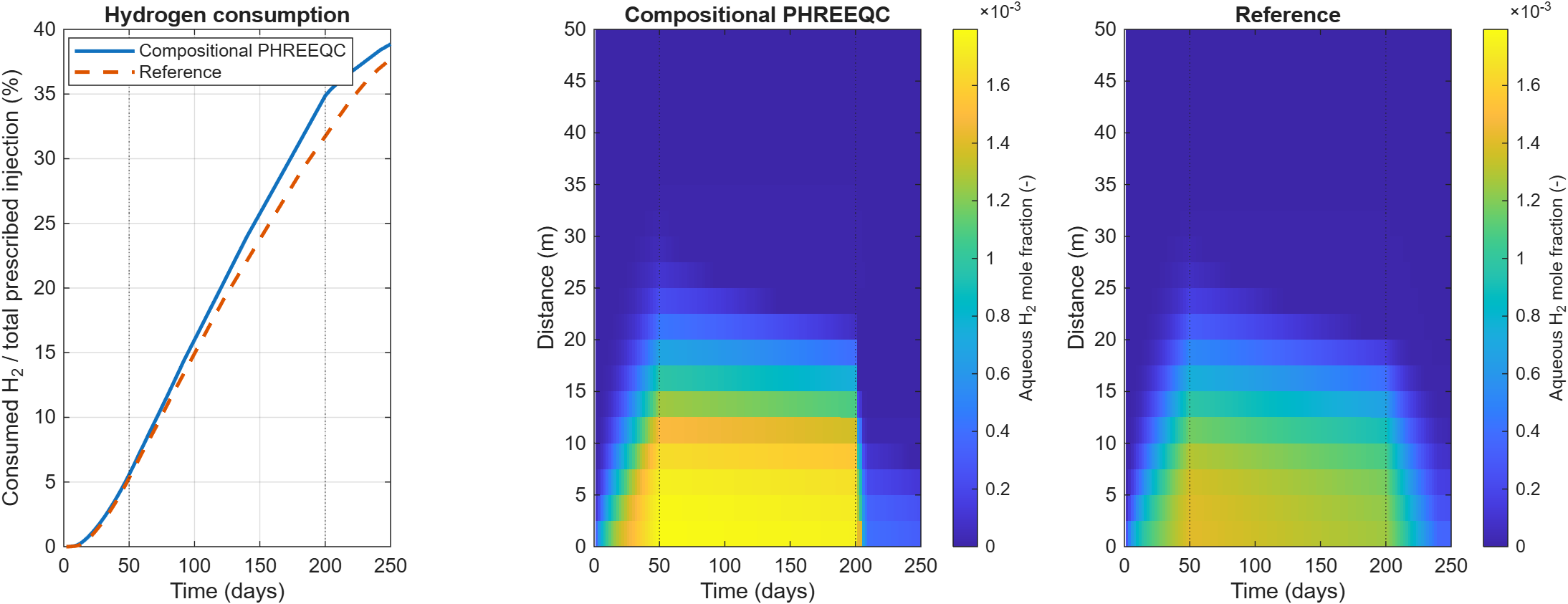
Complete-cycle PHREEQC validation. The source of the reference and the differences in chemistry splitting are described in the notebook.
Three-cycle 2D PHREEQC coupling
Completed three-cycle results, metabolic consumption, gas composition, pH, and a time-slider animation comparing mobile and cell-local populations.
Short chemistry walkthroughs
Four cells and two timesteps to check database loading, mineral inventories, pH, and saved output. A workflow check, not a spatial validation.
A complete 250-day comparison with compositional PHREEQC: hydrogen consumption by reaction, pH, and dissolved inorganic carbon.
Download the notebooks
Saved plots are embedded in the notebooks. The documentation build does not execute MATLAB or require a MATLAB notebook kernel.