
Results and plots
simulate and cyclic_steady_state return a ProcessResult. It holds the state of every bed and device after each time step the solver took:
| Field | Contents |
|---|---|
result.states | One state per time step; result.states[k][:Bed] is the state of unit :Bed |
result.timesteps | Length of each time step [s]; cumsum(result.timesteps) gives the times |
result.cycles | Number of cycles simulated |
result.converged, result.iterations, result.history | For a cyclic steady state: whether it converged, in how many iterations, and the change per iteration |
A result of simulate covers every cycle simulated, from time 0. A result of cyclic_steady_state covers only the steady cycle, with its times measured from the start of that cycle.
Following the approach to steady state
In the REPL, cyclic_steady_state prints each cycle as it runs. What it prints, and how it finds the steady state, are on the Cyclic steady state page.
Performance
performance returns a NamedTuple; the formulas are on the Model equations page.
| Field | Meaning | Unit |
|---|---|---|
purity | Mole fraction of the key component in the extract | – |
recovery | Fraction of the key component fed that leaves in the extract | – |
specific_energy | Pump and compressor work per tonne of key component in the extract | kWh/t |
productivity | Key component in the extract per m³ of adsorbent per second | mol/(m³·s) |
energy | Pump and compressor work over the cycle | J |
cycle_time | Duration of the cycle | s |
feed, extract, product | Moles of each component through the feed, extract and light product devices over the cycle | mol |
adsorbent_volume, adsorbent_mass | Adsorbent in all beds | m³, kg |
perf = performance(result)
perf.purity, perf.recovery
perf.extract[1] * 44.01e-3       # kg of CO₂ captured per cycle
Variables of beds and devices
The state of a fixed bed holds these variables. Values per cell are ordered from the bottom of the bed (cell 1, ncells), and values per component are in the order of the Gas.
| Variable | Size | Meaning | Unit |
|---|---|---|---|
:Pressure | ncells | Gas pressure | Pa |
:Temperature | ncells | Gas and sorbent temperature | K |
:WallTemperature | ncells | Wall temperature (WithWall beds only) | K |
:y | components × ncells | Gas mole fractions | – |
:AdsorbedConcentration | components × ncells | Loading | mol/m³ adsorbent |
To convert a loading to mol/kg, divide it by the adsorbent density. The cell centres are at fs[:Bed].data_domain[:cell_centroids][1, :] [m], for a flowsheet fs (process.flowsheet).
The state of a flow device holds the flow through it and the gas at each of its two ports:
| Variable | Size | Meaning | Unit |
|---|---|---|---|
:MolarFlow | 1 | Molar flow, positive from inlet to outlet | mol/s |
:InletPressure, :OutletPressure | 1 | Pressure at each port | Pa |
:InletTemperature, :OutletTemperature | 1 | Temperature at each port | K |
:InletComposition, :OutletComposition | components × 1 | Mole fractions at each port | – |
For example, the CO₂ mole fraction leaving the top of the bed, and the flow through the vacuum line, through time:
t = cumsum(result.timesteps)
y_CO2_top = [s[:Bed][:y][1, end] for s in result.states]
F_vacuum = [s[:V_vacuum][:MolarFlow][1] for s in result.states]
stream_totals adds up the moles of each component that passed through a device:
n = stream_totals(result.states, result.timesteps, :V_vacuum) # mol of CO₂, mol of N₂Export to a spreadsheet
write_results writes a result to a folder of CSV files, in bara, °C, mol%, kg/h, Nm³/h and mol/kg, with the units in the column headers:
result = cyclic_steady_state(process)
write_results("results/base_case", result)
For the four-step VSA of Mocca's library, some of the columns of the stream table streams.csv:
| Device | CO2 [mol%] | N2 [mol%] | Mean flow [kg/h] | Total [mol/cycle] |
|---|---|---|---|---|
| V_feed | 15.0 | 85.0 | 19.45 | 17.77 |
| V_product | 10.2 | 89.8 | 17.64 | 16.54 |
| V_vacuum | 79.51 | 20.49 | 1.803 | 1.229 |
| File | Contents |
|---|---|
summary.csv | Feed, stage durations, purity, recovery, productivity, specific energy, the mass balance of each component over the cycle, and the beds |
streams.csv | Stream table: one row per device, with its composition, mean flow and amount per cycle |
stage_streams.csv | The stream table for each stage |
stream_history.csv | Flow, composition, temperature and pressures of every device at every time step |
bed_history.csv | Pressure, temperatures, gas composition and loading at both ends of each bed at every time step |
bed_profiles.csv | The same along each bed, at the start of the cycle and the end of each stage |
process.json | The process, to read back with read_process |
The time series have one row per time step and device (or bed end), with the cycle and stage it belongs to, so a pivot table or a filter picks out one device or stage. For a spreadsheet set up with a decimal comma, use write_results(dir, result; delim = ';', decimal = ','). The Getting started example writes these files and reads some of them back.
For other variables, write the CSV file yourself:
t = cumsum(result.timesteps)
open("bed_top.csv", "w") do io
    println(io, "time_s,pressure_Pa,temperature_K,y_CO2,q_CO2_mol_per_m3")
    for (tk, s) in zip(t, result.states)
        b = s[:Bed]
        println(io, join((tk, b[:Pressure][end], b[:Temperature][end], b[:y][1, end],
            b[:AdsorbedConcentration][1, end]), ","))
    end
end
Plots
Mocca draws its plots with Makie. Each plot function returns a figure, which shows in VS Code's plot pane or a notebook. From a terminal, save it to a file instead: add CairoMakie to your environment (see Installation) and use save:
using CairoMakie
bed = process.flowsheet[:Bed]
bed_states = [s[:Bed] for s in result.states]
f = plot_cell(bed_states, bed, result.timesteps, 30)   # history of cell 30, the top of a 30-cell bed
save("bed_top.png", f)| Function | Shows |
|---|---|
plot_cell | Every variable of one cell through time, such as the outlet |
plot_state | Every variable along the bed at one time |
plot_profiles | Mole fractions and loadings along the bed at several times, such as the end of each step |
plot_flowsheet_streams | Flow and composition through each device, with the steps shaded |
plot_cell_comparison, plot_state_comparison | Several simulations of the same bed overlaid |
The figures below are for the steady cycle of the four-step VSA of Mocca's library, read with process = read_process("haghpanah_2013_four_stage_vsa") and run with result = cyclic_steady_state(process).
One cell through time
plot_cell shows every variable of one cell through the cycle. At the top of the bed (cell 30 of 30), the light product end:
Mocca.plot_cell(bed_states, bed, result.timesteps, 30)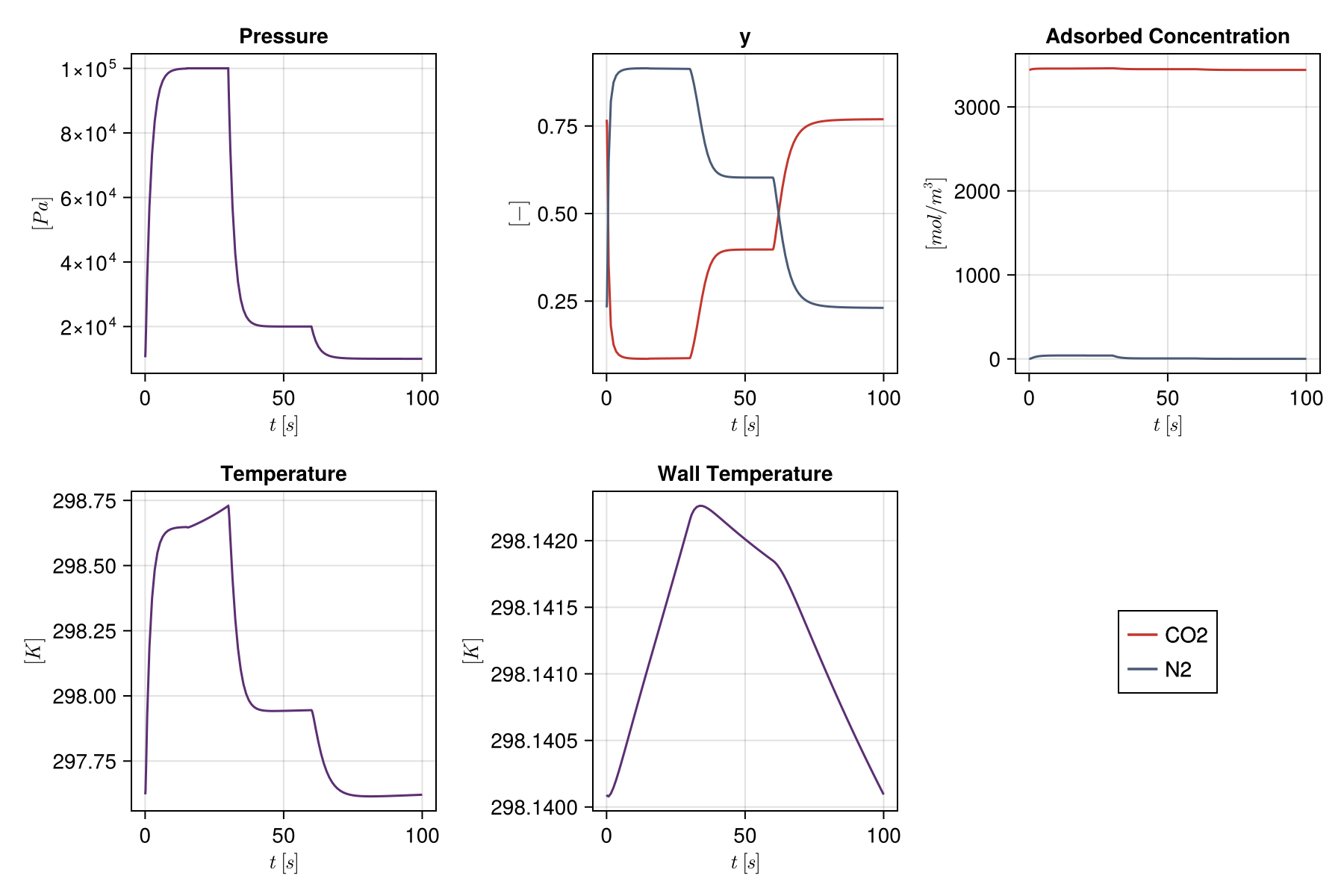
Along the bed at one time
plot_state shows every variable along the bed, here at the end of the cycle, after evacuation:
Mocca.plot_state(bed_states[end], bed)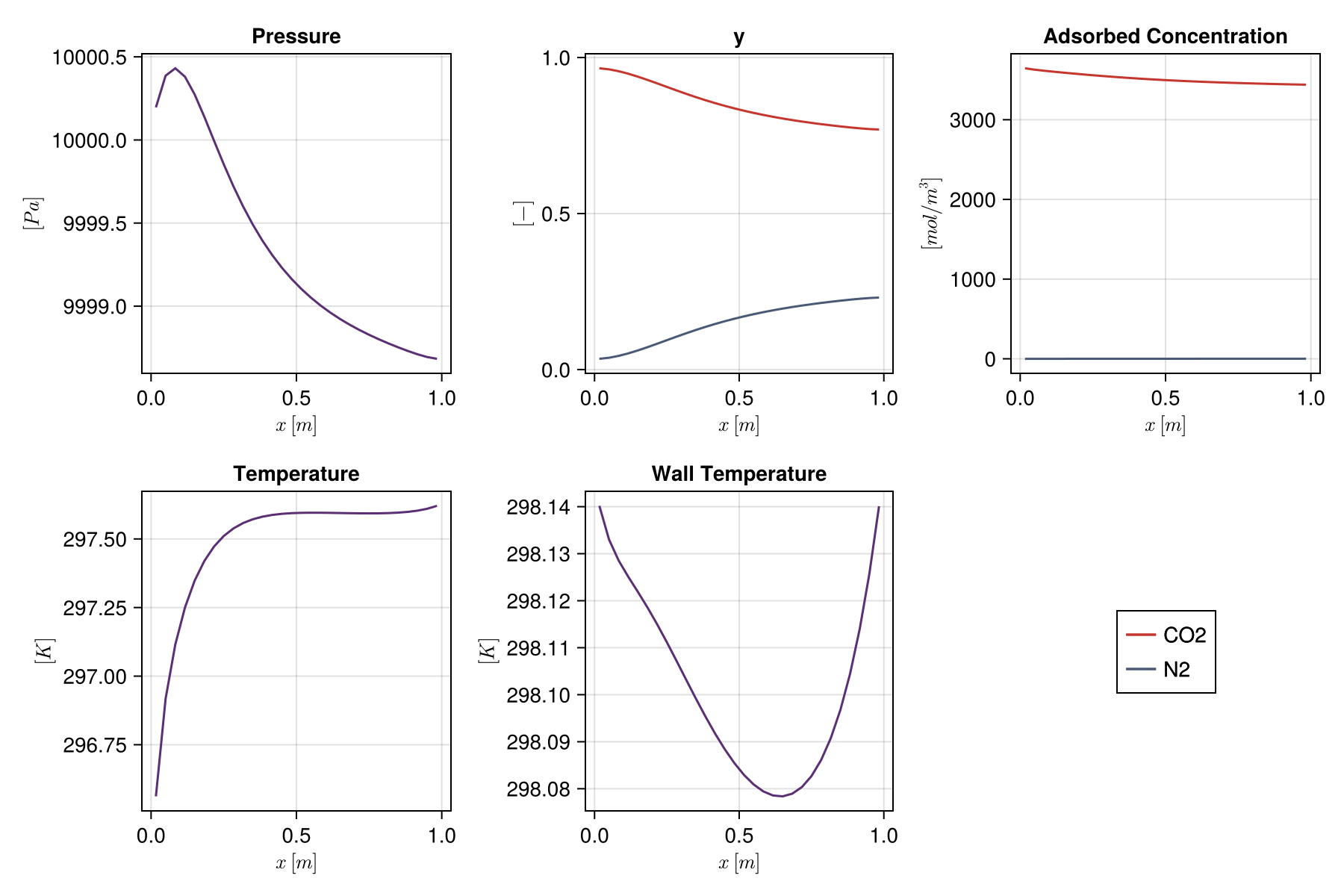
Profiles at the end of each step
plot_profiles shows mole fractions and loadings along the bed at several times, here the end of each step of the cycle:
step_ends = cumsum([st.duration for st in stages])
Mocca.plot_profiles(result.states, result.timesteps, bed, step_ends;
    labels = [st.name for st in stages], unit = :Bed)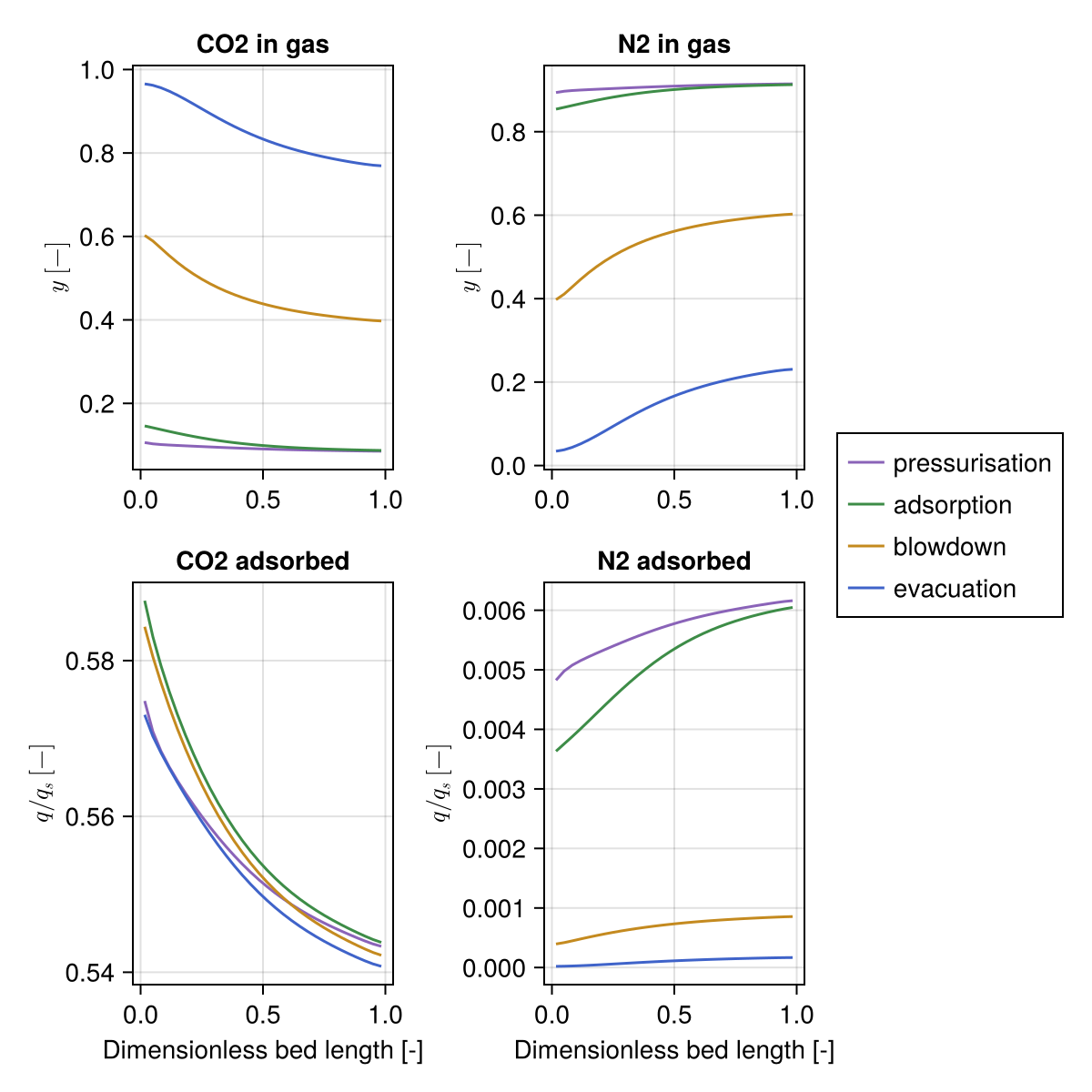
Streams through the devices
plot_flowsheet_streams shows the flow through every device and the mole fraction of the key component in it, with the steps shaded. Flow is positive from a device's inlet to its outlet:
Mocca.plot_flowsheet_streams(result.states, process.model, result.timesteps; stages = stages)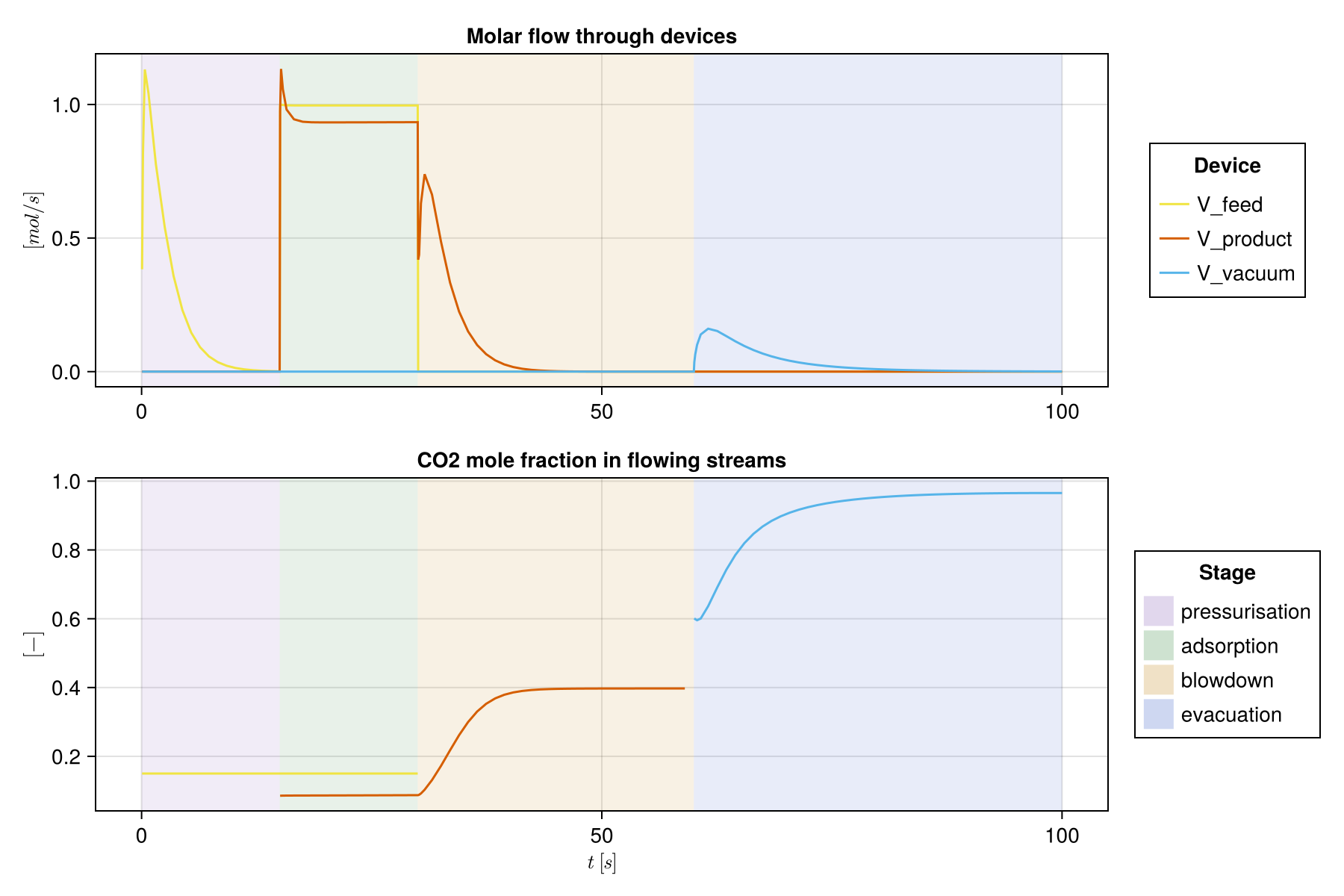
Comparing simulations
plot_cell_comparison and plot_state_comparison overlay several simulations of the same bed. Here the evacuation pressure is lowered from 0.1 to 0.05 bar, and the feed end of the bed (cell 1) compared through the cycle:
low = Mocca.read_process("haghpanah_2013_four_stage_vsa")
low[:P_L] = 0.05bar
result_low = Mocca.cyclic_steady_state(low; progress = false)
runs = ["P_L = 0.1 bar" => (bed_states, result.timesteps),
        "P_L = 0.05 bar" => ([s[:Bed] for s in result_low.states], result_low.timesteps)]
Mocca.plot_cell_comparison(runs, bed, 1)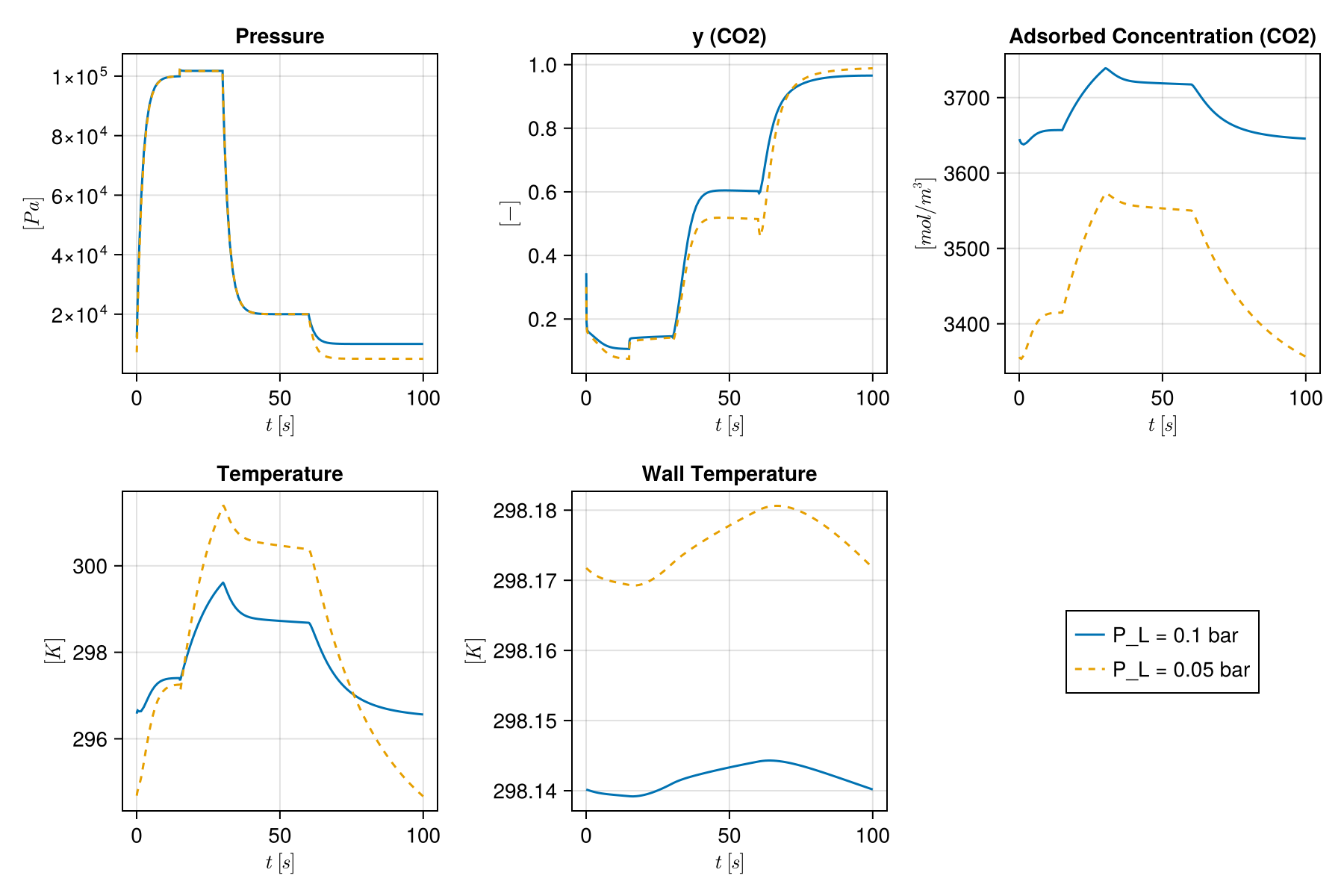
and along the bed at the end of the cycle:
Mocca.plot_state_comparison([label => first(r)[end] for (label, r) in runs], bed)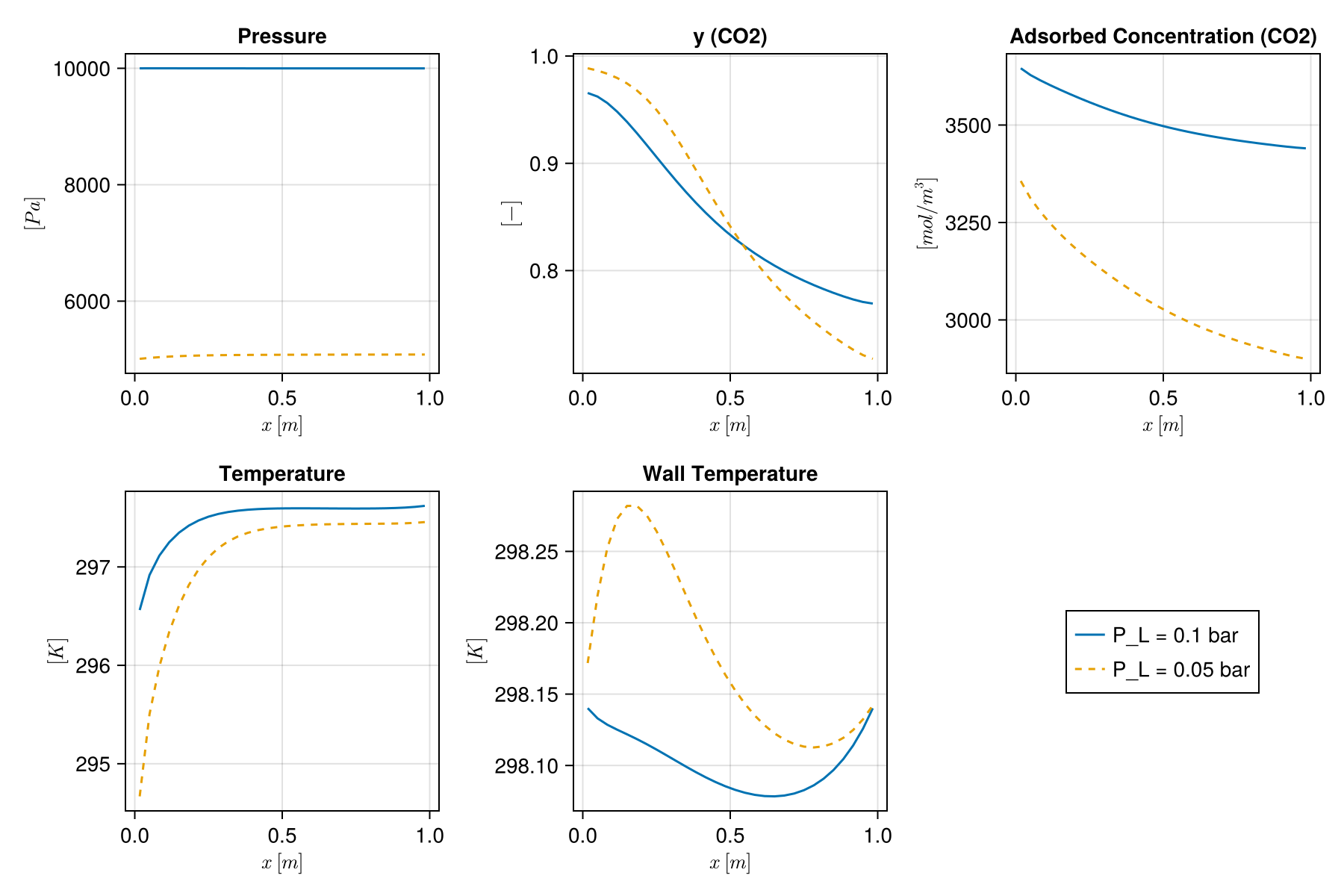
Mocca.Interface.ProcessResult Type
Result of simulating a Process: the states and timesteps of every step the solver took, the number of cycles they span, the initial state state0 of the last of them, and for a cyclic steady state whether it converged, the change per iteration or cycle in history and the cycle Jacobian if Newton's method found it.
Mocca.Interface.write_results Function
write_results(dir, r::ProcessResult; sigdigits = 8, delim = ',', decimal = '.') → Vector{String}Write result r to CSV files in directory dir (created if needed, files overwritten), and the process to process.json (see write_process) to rerun it. Returns the paths written.
The files hold, with the units in the column headers:
| File | One row per | Contents |
|---|---|---|
summary.csv | quantity | Feed, cycle, purity, recovery, productivity, energy, mass balance and beds, as Section, Quantity, Value, Unit |
streams.csv | device | Stream table over the last cycle: composition, mean flow, amount per cycle, temperature and pressures |
stage_streams.csv | stage and device | The same, for each stage of the last cycle, for devices with flow |
stream_history.csv | time step and device | Flow, composition, temperature and pressures through time |
bed_history.csv | time step, bed and end | Pressure, temperatures, gas composition and loadings at the bottom and top of each bed |
bed_profiles.csv | snapshot, bed and cell | The same along each bed, at the start of the last cycle and the end of each of its stages |
Pressures are absolute, in bar (bara); temperatures in °C; compositions in mol%; loadings in mol per kg of adsorbent; normal volumes (Nm³) at 0 °C and 1 atm. The composition and temperature of a stream are those of the gas upstream of the device, and are left empty while nothing flows. Flows are positive from the device's inlet (From) to its outlet (To). Amounts of a stream that flows both ways are net amounts, with the gas that flowed back under Reverse flow; the composition of net amounts is left empty if some components went each way.
The time-series files hold one row per time step of the solver, with the cycle and the stage it belongs to, so that they can be filtered or pivoted. For spreadsheets set up with a decimal comma, pass delim = ';', decimal = ','.
Mocca.Plotting.plot_cell Function
plot_cell(states, model, timesteps, cell)History of every variable of cell of a bed through time, one panel per variable, such as the outlet (cell = ncells, the top of the bed) or the feed end (cell = 1). states belong to the bed alone: for a process, pass [s[:Bed] for s in result.states], with model the bed (process.flowsheet[:Bed]) and the timesteps of the result.
Mocca.Plotting.plot_state Function
plot_state(state, model)Every variable along a bed at one time, one panel per variable. state is the state of the bed alone, such as result.states[end][:Bed] at the end of a simulation, and model the bed (process.flowsheet[:Bed]).
Mocca.Plotting.plot_profiles Function
plot_profiles(states, timesteps, model, times; labels, unit = nothing, components = all)Profiles along a bed at the given times [s], measured from the start of states: the gas mole fraction of each of components (top row) and its loading (bottom row). For a dual-site Langmuir isotherm the loading is shown relative to the component's saturation capacity qsb + qsd, as in the bed profile figures of Haghpanah et al. and Krishnamurthy et al. For flowsheet states, unit names the bed and model is the bed's model. Each time uses the last state at or before it.
Mocca.Plotting.plot_flowsheet_streams Function
plot_flowsheet_streams(states, model, timesteps; stages = nothing, component = 1)Molar flow through each flow device of a flowsheet (positive from inlet to outlet), and the mole fraction of component in each stream while it flows. With stages (as passed to setup_schedule), the stages of each cycle are shaded.
Mocca.Plotting.plot_cell_comparison Function
plot_cell_comparison(runs, model, cell; component = 1)Overlay the history of cell in several simulations of the same unit, one panel per primary variable. runs is a vector of label => (states, timesteps), where states belong to that unit alone (for a flowsheet, pass [s[:Bed] for s in states]). For variables with one value per component only component is shown.
Mocca.Plotting.plot_state_comparison Function
plot_state_comparison(states, model; component = 1)Overlay profiles along the column from several states of the same unit. states is a vector of label => state.
Mocca.Operation.stream_totals Function
stream_totals(states, timesteps, device; window = eachindex(states)) → VectorMoles of each component that crossed device from its inlet to its outlet over the steps in window. Components flowing backwards count as negative.
Mocca.Operation.vacuum_pump_energy Function
vacuum_pump_energy(states, timesteps, device; discharge_pressure = 101325.0,
    efficiency = 0.72, γ = 1.4, window = eachindex(states))
Work [J] to compress the gas leaving through device from its outlet pressure up to discharge_pressure, for an ideal gas with heat capacity ratio γ compressed adiabatically with isentropic efficiency. The gas enters the pump at the device's inlet temperature. Only steps with forward flow and an outlet below the discharge pressure count.
The defaults follow the vacuum pump model of Haghpanah et al. (2013).
sourceMocca.Operation.compressor_energy Function
compressor_energy(states, timesteps, device; suction_pressure = 101325.0,
    efficiency = 0.72, γ = 1.4, window = eachindex(states))
Work [J] to compress the gas entering through device from suction_pressure up to the device's outlet pressure, such as a feed compressor taking flue gas at atmospheric pressure up to the bed inlet. The gas is compressed adiabatically with isentropic efficiency, from the device's inlet temperature. Only steps with forward flow and an outlet above the suction pressure count, as in CompressorObjective.
Mocca.Operation.specific_energy_kwh_per_tonne Function
specific_energy_kwh_per_tonne(energy, n_product, molar_mass; component = 1)Energy per tonne of component produced, in kWh/t, given the energy [J], the product component totals [mol] and the component's molar mass [kg/mol].